C#

4. C# 웹 어플리케이션 만들기

지니 2017. 1. 28. 03:51
반응형

인터넷강의 보고 따라하지만.. 강의 내용대로 안되서 다시 정리해 봅니다.


배우면서 쓰는글이기 때문에 정답이 아닐수 있습니다.


1. Ctrl + Shift + N 으로 창을 띄우고
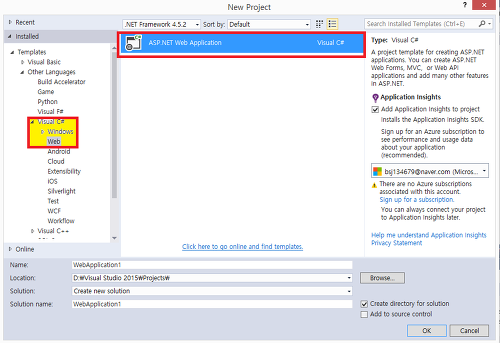


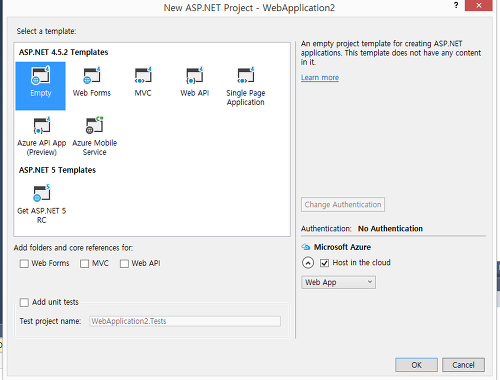
요로케 선택을 한다. 그리고 다음 화면에서 cancle 을 누르면 로컬에서?? 생성된다.


프로젝트 명을 클릭한 뒤 


add - web form 을 선택한다.
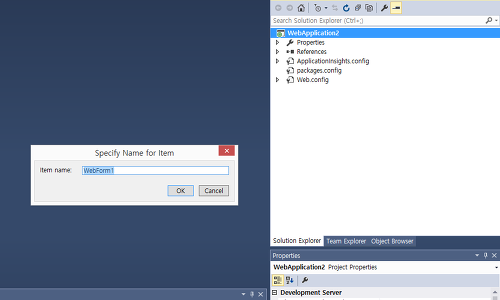


그럼 위 처럼 나온다. 이름을 적어주고 ok~
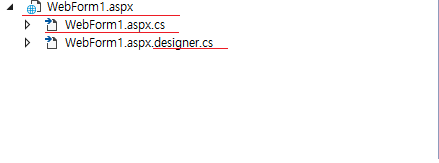


방금 추가한 web Form 이 위처럼 3가지 파일로 나온다~


일단 디자인을 먼저해봅시당


방법은 2가지가 있는듯 하다

1. html 코드로 코딩하는 방법


2. webForm1.aspx 를 우클릭하면  view designer 를 클릭해서 tool box로 추가하는 방법


일단 2로 추가해보겠습니다.


1. aspx.designer.cs 우클릭 -> view designer 클릭


toolbox 에서 text ,button , label 끌어다가 추가


그 이후에 소스코드로 확인하면 


=====================================================


<%@ Page Language="C#" AutoEventWireup="true" CodeBehind="WebForm1.aspx.cs" Inherits="WebApplication2.WebForm1" %>


<!DOCTYPE html>


<html xmlns="http://www.w3.org/1999/xhtml">

<head runat="server">

    <title></title>

</head>

<body>

    <form id="form1" runat="server">

    <div>

        <asp:TextBox ID="TextBox1" runat="server"></asp:TextBox>

        <asp:Button ID="Button1" runat="server" Text="Button" />

        <asp:Label ID="Label1" runat="server" Text="Label"></asp:Label>

    </div>

    </form>

</body>

</html>


=====================================================


붉은 색 부분이 방금 작업으로 추가된 것입니다.


이렇게 되었으면 , 프로그램을 실행해 봅시


그 다음으로 

aspx.designer.cs 우클릭 -> view code 클릭해서 보면


=====================================================


 /// <summary>
        /// TextBox1 control.
        /// </summary>
        /// <remarks>
        /// Auto-generated field.
        /// To modify move field declaration from designer file to code-behind file.
        /// </remarks>
        protected global::System.Web.UI.WebControls.TextBox TextBox1;
        
        /// <summary>
        /// Button1 control.
        /// </summary>
        /// <remarks>
        /// Auto-generated field.
        /// To modify move field declaration from designer file to code-behind file.
        /// </remarks>
        protected global::System.Web.UI.WebControls.Button Button1;
        
        /// <summary>
        /// Label1 control.
        /// </summary>
        /// <remarks>
        /// Auto-generated field.
        /// To modify move field declaration from designer file to code-behind file.
        /// </remarks>
        protected global::System.Web.UI.WebControls.Label Label1;


=====================================================


이게 추가되어있을 것입니다.

아마, php,asp 와는 다르게 UI 하나하나 이런식으로 정의가 되어야 하나 봅니다.


자, 그럼 폼도 만들어졌고 , 정의도 되었으니까 기능을 넣어보도록 합니다.

저번과 똑같이 button 을 더블 클릭해보면~ 자동으로 화면이 이동되면서


=====================================================
protected void Button1_Click(object sender, EventArgs e)
        {

        }


=====================================================

위 코드가 막 ~ 생성되었을 겁니다.

느낌오죠?? Button1 클릭하면 실행될 함수겠네요

음 이번엔 간단하게 textbox 의 값을 label 에 복사하는 기능을 넣어볼까 합니다.


 Label1.Text = TextBox1.Text;


짜라라~~ 딱 한줄입니다 ㅋㅋㅋ


코드 넣고 실행하면~~


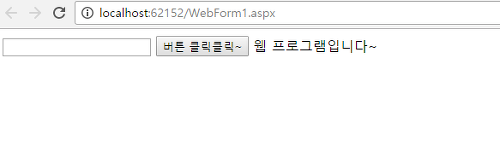
이렇게 됩니다~


1~4 까지


콘솔

윈도우


맛보기를 해봤습니다~


반응형