C#
1. C# Console 프로그램 - 글씨 써보기
지니
2017. 1. 28. 01:36
반응형
1. Ctrl + Shift + N 으로 창을 띄우고
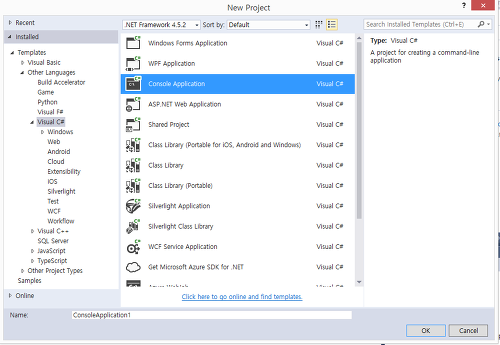
콘솔 어플리케이션 선택
======================================================
using System;
using System.Collections.Generic;
using System.Linq;
using System.Text;
using System.Threading.Tasks;
namespace ConsoleApplication1
{
class Program
{
static void Main(string[] args)
{
}
}
}
======================================================
기본적으로 이런식으로 나온다..
======================================================
using System;
using System.Collections.Generic;
using System.Linq;
using System.Text;
using System.Threading.Tasks;
namespace ConsoleApplication1
{
class HelloWorld
{
static void Main(string[] args)
{
Console.Write("Hello, World!"); // 줄 안띄움
Console.WriteLine("Hello, World!\a"); // 줄 띄움
// \a 삑!
//Console.ReadLine();
Console.ReadKey();
//namespace -> class -> main
}
}
}
======================================================
붉은글씨가 추가된 부분이다.
Console.Write <-- 줄 변경없음
Console.WriteLine <-- 줄 변경됨
Console.ReadKey(); <-- 무언가 타이핑이 되면 다음단계로 넘어간다.
반응형