이미지 미리보기 및 업로드
동작하는 모습입니다.
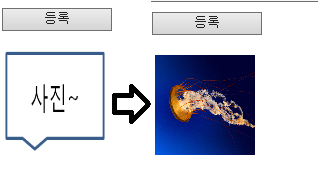

아래 코드를 넣고 실해하면 바로 동작합니다.
각 언어별 파일 업로드 방법은 기존과 동일합니다.
예- php)
if($_FILES['uploadImg']['name']){
if (move_uploaded_file($_FILES['uploadImg']['tmp_name'], $uploadfile)) {
echo "성공적으로 업로드 되었습니다.\n";
}
}
=====================================================================================================================
<script type="text/javascript" src="http://code.jquery.com/jquery-3.3.1.js"></script>
<style>
.image-upload > input{display: none;}
</style>
<script type="text/javascript">
function ChkForm(mode){
if($("#uploadImg").val() ==""){
alert("이미지를 등록해주세요.");
return;
}
$("#frm").submit();
}
$(document).ready(function(){
$("#uploadImg").on("change", handleImgFileSelect)
})
function handleImgFileSelect(e){
var sel_files = [];
var files = e.target.files;
var filesArr = Array.prototype.slice.call(files);
//alert(files)
//alert(filesArr)
filesArr.forEach(function(f){
if(!f.type.match("image.*")){
alert("이미지파일만 업로드 가능합니다.");
return;
}
sel_files.push(f);
var reader = new FileReader();
reader.onload = function(e){
$("#imgsrc").attr("src" , e.target.result)
}
reader.readAsDataURL(f);
});
}
</script>
<body>
<div class="search" style="width:100%;height:40px;float:left;">
<div style="width:10%;float:left;">
<input type="button" value="등록" style="width:100%;" onclick="ChkForm('')">
</div>
</div>
<div style="width:100%;margin:10px 0 0 0;">
<form name="frm" id="frm" action="./ImgUpload_proc.php" method="post" enctype="multipart/form-data">
<input type="hidden" name="mode" id="mode" value="">
<table class="table01">
<col width="25%"/>
<col width="75%"/>
<tr style="height:100px;">
<td >
<div class="image-upload" >
<label for="uploadImg">
<img src="./cam.png" style="height:100px;width:100px;" id="imgsrc" >
</label>
<input type="file" id="uploadImg" name="uploadImg" />
</div>
</td>
</tr>
</table>
</form>
</div>
</body>
</html>
=====================================================================================================================